




Digital Signage System: The Complete 2027 Guide for Businesses



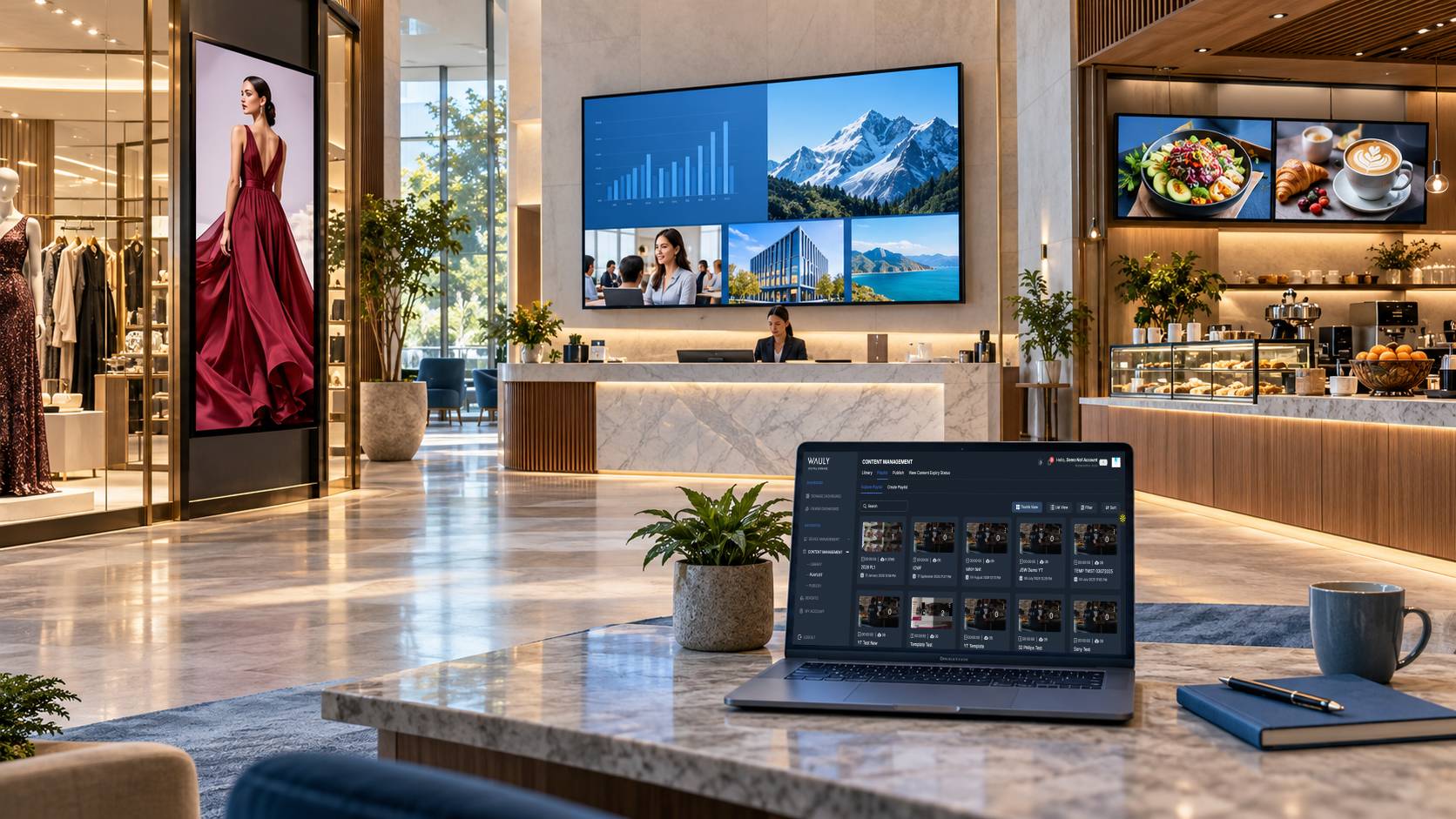
A digital signage system connects displays, playback devices, content management software and a network so you can publish and manage content across one screen or hundreds of locations from a single dashboard. Instead of updating each screen by hand, authorised teams publish the right content to the right screens at the right time.
It does more than show content. Publishing, scheduling, local playback, remote monitoring and integrations with business systems turn individual screens into a managed communication network. Marketing teams need consistent campaigns, IT teams need compatible devices and security, and multi-location businesses need both.
This guide covers how a digital signage system works, its components, offline behaviour, display choice, costs in India and how to choose the right digital signage solution.
What Is a Digital Signage System?
A digital signage system is an integrated arrangement of display hardware, playback technology, digital signage software, content and connectivity used to publish and present visual information. It can show images, video, promotions, digital menus, announcements, dashboards and wayfinding information. A basic setup is one display, a media player and a content management system (CMS). An enterprise deployment can span hundreds of screens, with user roles, scheduled publishing, monitoring and integrations with POS, inventory, HR or business intelligence tools.
The key difference between a digital display and a digital signage system is centralised control. A display shows content; a signage system manages what appears, where it appears and when it plays. A company with 80 branches can ask each branch to update its own screen, or publish to defined screen groups from one platform.
Types of Digital Signage Displays and Systems
Display signage systems come in several formats, and the right one depends on location, audience and goal.
- Indoor displays: stores, offices and lobbies. See indoor displays.
- Outdoor and high-brightness displays: window-facing and open-air sites that need weather protection and high brightness.
- Interactive kiosks and touchscreens: browsing, check-in and self-service.
- Digital menu boards: instant price and combo changes. See signage for restaurants and QSR.
- Video walls and LED displays: large canvases for atriums and events. See LED video walls.
- Wayfinding, queue displays and standees: directions, token numbers and point-of-decision promotion.
How Does a Digital Signage System Work?
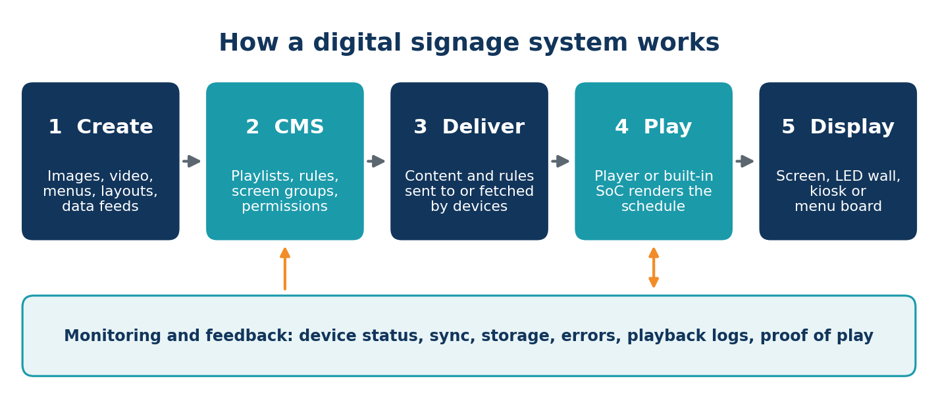
Every system follows the same delivery path, from content preparation to on-screen playback, with a monitoring layer reporting back.
-
Content is created or uploaded. An authorised user prepares images, video, menus or multi-zone layouts and organises them into playlists or campaigns. Resolution, aspect ratio and file format must suit the playback environment.
-
Publishing rules are set. The user picks screens, dates, time slots, screen groups and approval steps. A retailer might publish one national campaign everywhere and a regional offer to selected branches.
-
Content is delivered. The platform pushes content to devices, or devices fetch it at check-in. Many systems store media locally; others stream live dashboards or feeds. Publishing is not proof of delivery.
-
The playback device renders it. The media player or built-in system applies the schedule and layout. Unsupported formats, low storage, outdated firmware or wrong settings can stop content displaying correctly.
-
The system reports status. Devices can send last check-in, health, storage, errors, playback logs or proof of play to the platform.
Online does not mean correct.
A device can stay connected while the display is off, on the wrong input or playing outdated content. Confirm playback with evidence, not just a green status light.
Choosing a Digital Signage Display Screen and OEM
The right digital signage display screen depends on environment, brightness, operating hours, operating system, warranty and platform compatibility, more than on brand.
Commercial-Grade Displays vs. Consumer TVs
Consumer TVs are built for a few hours of viewing a day. Commercial panels are rated for long hours, handle heat better and carry business warranties. A QSR drive-thru board prioritises brightness and 24/7 reliability; a corporate lobby screen prioritises design and built-in playback.
Samsung, LG, Philips and Other OEMs
| OEM | Platform and strengths | Verify before buying |
|---|---|---|
| Samsung | Broad commercial range; Tizen-based smart signage and embedded players on supported models | Brightness, rated hours, Tizen version, CMS compatibility, warranty |
| LG | webOS portfolio across standard, high-brightness, outdoor, video wall and touch formats | webOS version, SoC capability, app support, warranty |
| Philips | Android-powered professional displays supporting native Android and web apps | Android version, app compatibility, performance, service coverage |
| Other OEMs | Competitive pricing, specialised formats, local support | Firmware policy, security, OS longevity, spares, service network |
Features, operating systems and brightness vary by model and region, so validate the exact model before purchase.
How to Select the Right Display
- Match the screen to the environment: indoor, window-facing, outdoor or high-traffic.
- Confirm the rated hours (16/7 or 24/7) match actual use.
- Check that your software supports the display’s OS, model series and player version.
- Compare warranty, onsite support and regional service.
- Pilot the exact model with your content before scaling.
Wauly supplies digital signage hardware: plug-and-play touch and non-touch screens with customisation and installation support.
Key Components and Architecture of a Digital Signage System
The 7 Key Elements of Digital Signage
- Display: LCD, LED, touch or video wall screen
- Media player or built-in playback: stores and renders content
- Digital signage software: the CMS that manages everything. See Wauly’s digital signage software.
- Content: video, images, menus, feeds and templates
- Publishing rules: schedules, screen groups and approvals
- Network connectivity: Wi-Fi, LAN or mobile data
- Monitoring and administration: support, alerts and device management
Five Functional Layers
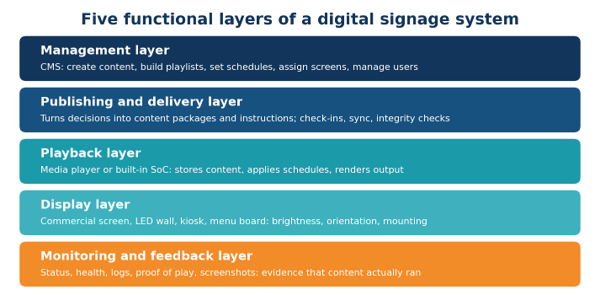
Platforms combine these functions differently, but the responsibilities stay the same. Device monitoring, playback logs, proof of play and screenshots are not interchangeable, so check which evidence a platform actually provides.
Digital Signage Display vs. Digital Signage System
| Element | What it does |
|---|---|
| Display | Presents content to the audience |
| Media player or built-in playback | Processes and renders content for the display |
| Digital signage software | Manages content, schedules, screen assignments, users and devices |
| Network | Carries content, instructions and status information |
| Content workflow | Determines what is published, where and when |
| Monitoring and administration | Helps teams manage devices and investigate issues |
Some commercial displays include built-in playback, so no separate media player is needed.
What Happens When a Digital Signage System Goes Offline?
A system that stores approved content and schedules locally can keep playing through a temporary network loss. One that depends on a live website, stream or feed behaves differently. When connectivity returns, the device reconnects, retrieves pending updates, verifies content and synchronises. Ask every vendor:
- Can the device play locally stored media, and for how long?
- Can it receive updates while disconnected, and what happens after reconnection?
- What happens when a data feed or stream becomes unavailable?
- Does the platform flag disconnected devices, and how quickly?
- Can it show fallback or last-known-good content?
For critical environments, test these scenarios in a pilot, not during an outage.
Troubleshooting Common Issues
| Observed issue | Possible causes | What to check |
|---|---|---|
| Old content on screen | Update not received, sync issue, wrong schedule | Publishing status, sync, schedule, cached content |
| Black screen | Power, wrong input, player failure, cable | Display power, input source, signal path, player status |
| Video stutters | Unsupported format, low resources, network-dependent playback | Media specs, player compatibility, storage, delivery method |
| One branch misses a campaign | Wrong screen assignment, connectivity, device problem | Screen group, device status, comparison with a working branch |
| Device appears offline | Network interruption, power loss, hardware or software failure | Connectivity, power, last check-in, diagnostics |
If one screen fails while others in its group work, investigate that device. If a whole location fails, check shared network or power.
Cloud Based Digital Signage Platform: Deployment Models and Features
Cloud, On-Premise and Hybrid Systems
| Model | Best suited for | Key consideration |
|---|---|---|
| Cloud-based | Multi-location teams needing remote management | Connectivity, security, data handling, service availability |
| On-premise | Organisations with infrastructure or governance requirements | Internal responsibility for servers, updates, backups, recovery |
| Hybrid | Central control plus local resilience | Clear ownership of cloud, local and device components |
A cloud based digital signage platform hosts management remotely, which simplifies administration, updates and scaling. The trade-off is dependence on connectivity and the vendor’s security. For most multi-location businesses, a cloud based digital signage solution is the practical choice; on-premise suits strict governance but adds maintenance, and hybrid keeps central control in the cloud while devices store content locally.
Must-Have Software Features
- Drag-and-drop content design and ready templates
- Playlists and minute-level scheduling
- Screen grouping and bulk publishing
- Role-based access and approval workflows
- Remote monitoring and uptime alerts
- Proof-of-play reports and analytics
- Mobile app for quick updates
Integrated Signage: Connecting Business Systems
An integrated signage setup pulls live data from menus, pricing, inventory, calendars, social feeds or dashboards, so content stays current without manual edits. Ask which integrations and APIs a vendor supports, and what screens show if a data source fails.
Security and Access Control
Signage devices are part of your business network and should be managed accordingly.
- Strong, unique passwords and multi-factor authentication for administrators
- Role-based permissions limiting users to the screens and functions they need
- Regular software, firmware and player updates; devices isolated from sensitive systems
- Encrypted device-to-platform communication, plus monitoring for unusual logins and unauthorised changes
- Physically secured players, with access revoked when devices are replaced
Wauly’s platform uses a 12-layer security framework, certified by CERT-In.
Digital Signage Solutions by Industry
- Retail and malls: retail signage.
- Restaurants and QSR: restaurant signage.
- Corporate offices: corporate signage.
- Banks and BFSI: banking signage.
- Healthcare: healthcare signage.
- Hotels and hospitality: hospitality signage.
- Education: education signage.
- Government: government signage.
- Airports and transport: transport signage.
- Events and museums: schedules, exhibits and sponsor content.
See real examples in Wauly’s use cases.
Benefits of a Digital Signage System
- Instant updates and central control
- Higher engagement than static posters
- Lower long-term cost: no repeated printing
- Consistent branding across sites
- Better experience for customers and staff
How Much Does a Digital Signage System Cost in India?
Cost Components and Total Cost of Ownership
A system has five cost blocks: screens, media players, software subscription, installation, and content plus support. Hardware is mostly one-time; software is usually a recurring subscription. Compare options over three years, because a cheaper screen with weak support often costs more over time. Watch for hidden costs: custom design, mounting and electrical work, network upgrades, replacement players and per-user or per-feature add-ons.
Wauly Pricing
Wauly’s Professional plan starts at $10 per month and covers multi-screen management, scheduling, built-in design tools, a media library, proof-of-play reports and a mobile app. Enterprise plans are custom for networks of more than 50 displays, adding unlimited users, approval workflows, custom integration, uptime alerts, AMC and managed services. See current pricing and plans.
How to Choose the Right Digital Signage Solution
Five-Step Selection Framework
- Define the goal: sales, information, wayfinding or internal communication.
- Count screens and locations now and in three years.
- Decide whether you need hardware, software, managed services or all three.
- Shortlist vendors on features, security, offline behaviour and support.
- Pilot at one site, then roll out.
What to Evaluate and Ask Vendors
- Compatibility: which displays, players and operating systems are supported?
- Distribution and scheduling: how do updates reach devices, and can locations customise?
- Offline and recovery: what is stored locally, and what is the fallback content?
- Monitoring evidence: status only, or also logs, proof of play and screenshots?
- Access and integrations: which permissions, approvals and data sources are supported?
- Support: who handles installation, AMC, device replacement and troubleshooting?
Implementation, Content and ROI
Set Up a Digital Signage System in Seven Steps
- Define goals and audience for each screen.
- Choose screens and players.
- Choose software that fits your scale.
- Install and connect to power and network.
- Create and schedule content with templates.
- Pilot, then scale.
- Monitor and maintain with alerts and regular refreshes.
Content Best Practices
- Design for distance: large text, high contrast, one message per slide.
- Match content to place and time, such as breakfast menus in the morning.
- Use local languages to widen reach across India.
Measuring ROI
Match metrics to the goal: sales lift on promoted items, reduced perceived wait time, or message recall for internal communication. ROI (%) = (Gain from signage − Total cost) ÷ Total cost × 100. Gains include incremental sales, printing and logistics saved, and staff time saved.
Mistakes to Avoid
Buying consumer TVs for round-the-clock use, choosing hardware before software, overloading slides with text, ignoring security, skipping the pilot, and letting content go stale.
Why Businesses Choose Wauly for Digital Signage
Wauly brings cloud-native software, plug-and-play hardware and managed services together, so you work with one team instead of three vendors. • Works with existing TVs, outdoor LED walls and touch panels • 12-layer, CERT-In certified security • AI-based audience analytics using anonymised data • Scales from a single screen to 1,000+ screens • Trusted by brands such as BPCL, HPCL, ISRO, ICICI Bank, HDFC Bank, Axis Bank, L’Oréal and Budweiser Ready to see it in action? Book a demo or view plans.
Conclusion
The question is not whether a screen can show content, but whether the whole digital signage system can deliver the right content to the right screen at the right time, and give you enough visibility to investigate when something goes wrong. Start with a clear goal, choose software, security and support first, pilot, then scale. Explore Wauly’s digital signage software and hardware, read more on the Wauly blog, or contact us for a free demo.
Key takeaways
- A digital signage system = displays + playback device + management software (CMS) + network + content.
- Centralised control is what separates a signage system from a screen that merely plays video.
- A cloud based digital signage platform simplifies multi-location management; test offline behaviour first.
- “Online” does not prove the right content is playing, so look for playback evidence.
- Compare total cost of ownership, security and support, not just screen price.
Recent blogs

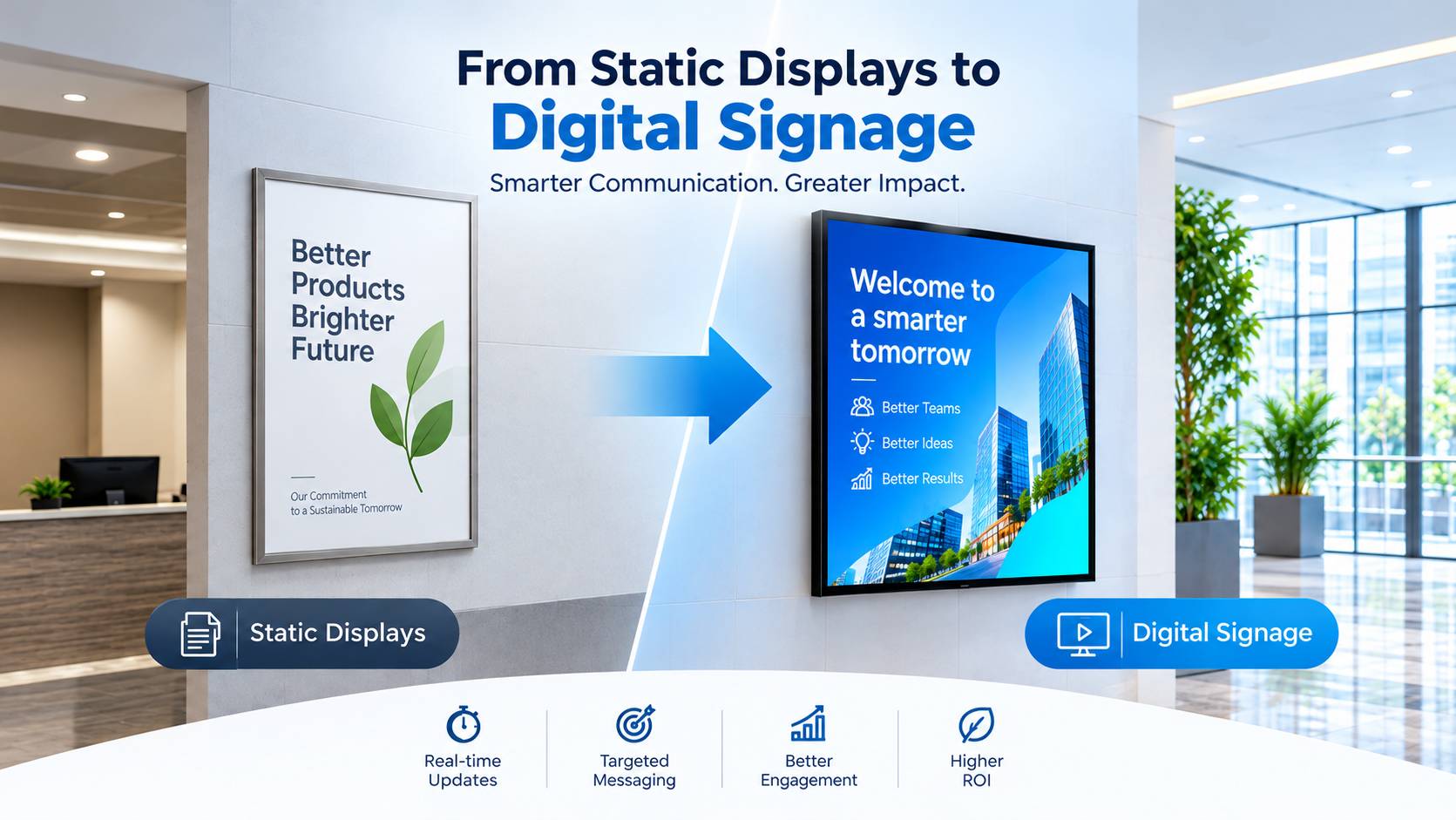
Successfully transition from static displays to digital signage
If you need a reason to transition from static to digital signage, here are three
Read MoreIncreasing consumer purchases and reducing marketing costs
Numbers don’t lie. Studies suggest that 76% of buyers claim to enter.. store for the first time ever because of signage
Read MoreWhy digital signage solutions are best for restaurants
As a restaurateur, you would want your eatery to be people’s first preference.
Read MoreMost Recent blogs
Digital Signage vs Vinyl Printing: Which Is Better for Your Business?
Compare digital signage and vinyl printing across content updates, multi-location management, customer engagement, and operating costs to choose the right solution for your business.
Read More
Digital Signage Software: Centralized vs Decentralized Models
A practical look at how enterprises can balance centralised control and local flexibility when managing digital signage across multiple offices, teams and locations.
Read More
Digital Signage Software: Offline’s New Performance Marketing Benchmark
Explore how digital signage software is redefining performance for retail and other offline businesses by enabling centralized control, smart scheduling, consistent communication, and scalable screen management across every location.
Read More
The Revenue Leak Most Businesses Never Measure: Why Digital Signage Is No Longer Optional
Every business invests to bring customers through the door, but many lose revenue once they're inside. Static posters, outdated displays, and manually managed screens fail to influence purchase decisions when they matter most. This blog explores how modern digital signage software helps businesses automate promotions, manage screens remotely, maintain brand consistency, and increase sales across multiple locations. Learn why the real value of digital signage lies not in the screens themselves, but in the software that powers them.
Read More
The Biggest Problem in Internal Communication Isn't Communication. It's Attention.
In today's workplace, information isn't rare, attention is. Organizations that continue measuring communication by the number of emails they send are solving yesterday's problem. The real challenge is ensuring important messages are actually seen, remembered, and acted upon.
Read More